

-
Language
-
Africa
-
Asia Pacific
-
Europe
-
Latin America
-
Middle East
-
North America
-
- Support
- Contact Us
-
-
Need a Honeywell Account?
Create an AccountAlready have a Honeywell account?
Sign In -
Home My Account Order Management Invoice Management Case Management Saved Carts Address Book Legacy myTransactions Price Agreement Wishlist Advanced Search Preferred Business EntitymyProcess Home My Account Favorites Saved Cart Address Book Order Management Invoice Management Quote History Discount History Service ContractsMy Account My Profile My Orders My Orders Shop My Quotes My Returns Saved Carts Return Requests Invoices My Contracts Case History Work Order History My Subscriptions My Assets Manage Trainings & UsersCurrency:Localize your Content
You can set your preferred currency for this account.
Currency- CHOOSE YOUR CURRENCY
Update Currency
Changing Currency will cause your current cart to be deleted. Click OK to proceed.
To Keep your current cart, click CLOSE and then save your cart before changing currency.
Select AccountSwitching accounts will update the product catalog available to you. When switching accounts, your current cart will not move to the new account you select. Your current cart will be available if you log back into this account again.
Account# Account Name City Zip/Post Code PROCEEDCANCELMy Account
-
You are browsing the product catalog for
You are viewing the overview and resources for
to view parts associated with your account
Innovation That Endures
Addressable Control Panels
Question:
I have CRF-300’s (Relay 1FC) zone assigned to my detectors but they don’t latch when I test the detectors in Walktest.
Answer:
In Walktest mode only “Silenceable” outputs will be activated, if your relays are programmed as “Non-Silenceable” they will not latch.
Question:
Is it possible to delay the activation of an addressable relay?
Answer:
No, we have no way of delaying the activation of an addressable relay.
Question:
How do you program for AlarmNet communications in the ES-50X and ES-200X FACPs with FS-Tools?
Answer:
Click here
Question:
Connecting Two or More Power Supplies in Sync
Answer:
Connecting Two or More Power Supplies in Sync
The Sync source Panel or first FCPS-24FS 6/8 in a series of 2 or more should be set as a Sync Generator or "Master." Use one of the output circuits off the "Master" FCPS-24FS 6/8 to trip the second power supply. The second power supply and all others after it will all be configured as "Sync Followers" or "Slaves".
See Also: FCPS-FS6 & FS8 Field Charger Power Supplies Manual.
Question:
What is the difference between a module trouble “OPEN” and “INV REP”?
Answer:
The “INV REP” trouble is referring to the SLC side of the module, and communications with the panel, while an “OPEN” is dealing with the input side of the module, and supervision of an attached device.
Question:
My MS-25 is displaying “AC1”, but I have good AC power what does this mean?
Answer:
The “AC1 or2” message on the MS-25 is not referring to the AC Line Voltage, but rather the Central Station Account 1 or 2. This trouble also referred to as a “COMM Fault” means that the panel was not able to communicate with Central Station after 10 attempts. Note that this is not necessarily referring to the physical phone line 1 or 2 but the Primary or Secondary Account.
Question:
The communicator on the MS-25 is similar to the MS-5\10UD panels in that there is no “DACT Enabled” function (as in the addressable panels). The options “Dial Tone Detection” and “Line Monitoring Enabled” are Supervision functions only.
Answer:
The “AC1 or2” message on the MS-25 is not referring to the AC Line Voltage, but rather the Central Station Account 1 or 2. This trouble also referred to as a “COMM Fault” means that the panel was not able to communicate with Central Station after 10 attempts. Note that this is not necessarily referring to the physical phone line 1 or 2 but the Primary or Secondary Account.
Question:
The communicator on the MS-25 is similar to the MS-5\10UD panels in that there is no “DACT Enabled” function (as in the addressable panels). The options “Dial Tone Detection” and “Line Monitoring Enabled” are Supervision functions only.
Answer:
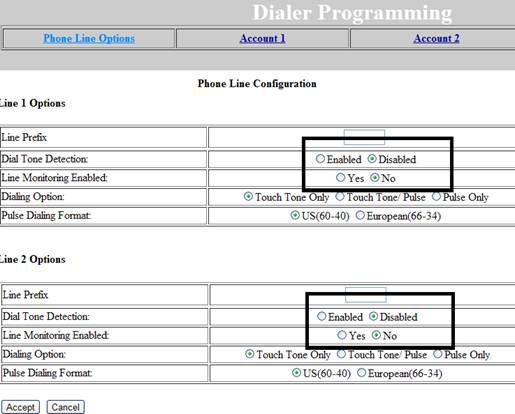
The communicator is “Enabled” by selecting the required Reporting Filters either “Must” or “Yes”.

Question:
My MS-25 is displaying “AC1”, but I have good AC power what does this mean?
Answer:
The “AC1 or2” message on the MS-25 is not referring to the AC Line Voltage, but rather the Central Station Account 1 or 2. This trouble also referred to as a “COMM Fault” means that the panel was not able to communicate with Central Station after 10 attempts. Note that this is not necessarily referring to the physical phone line 1 or 2 but the Primary or Secondary Account.
Question:
The communicator on the MS-25 is similar to the MS-5\10UD panels in that there is no “DACT Enabled” function (as in the addressable panels). The options “Dial Tone Detection” and “Line Monitoring Enabled” are Supervision functions only.
Answer:
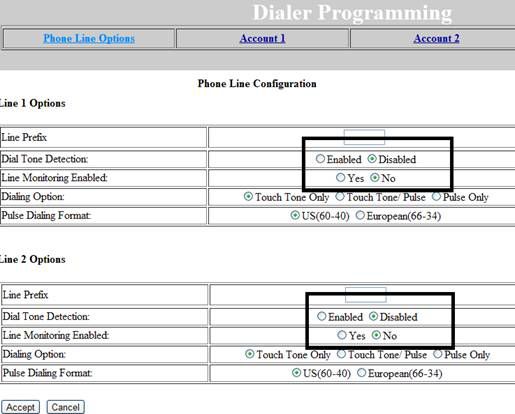
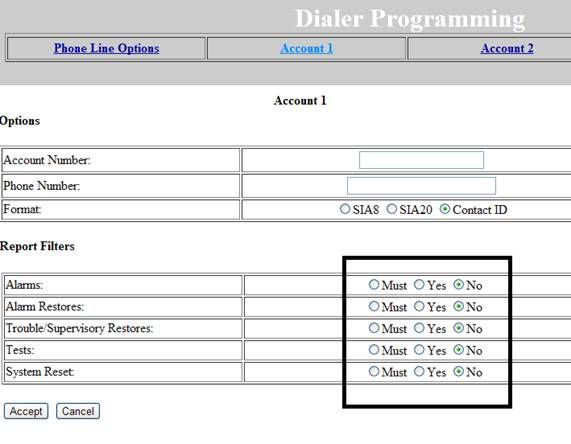
The communicator is “Enabled” by selecting the required Reporting Filters either “Must” or “Yes”.
Question:
I am installing an MS-9050UD and the transformer just has two wires for connecting the AC. My jurisdiction does not allow wire nuts on the AC what can I do?
Answer:
The optional AC-TRMBLK is a screw terminal block that mounts to the chassis for making this connection.
Copyright © 2026 Honeywell International Inc

Maximum File Size
Maximum Files Exceeded
Due to inactivity you will be logged out in 000 seconds.
Maximum File Size
Maximum Files Exceeded
You cannot access this page as this product is not available in your country.
Maximum File Size
Maximum Files Exceeded

This product is not available in your country.
You cannot access this page as this product is not available in your current country. To view this product, please change your product catalog view.
View product catalog for:
We use cookies and similar tracking online technologies to improve website performance, record website activities, facilitate information sharing on social media and offer advertising tailored to your interest. For more information, see our Cookie Notice and Terms and Conditions. You can also customize your browser’s cookie settings. Please note that if you refuse cookies, it may affect site functionality and performance.